Securing the Modern AI Stack
May 05, 2026. 15 min

CloudAEye Code Review now supports fully self-hosted, on premises deployments, enabling organizations to adopt AI powered code reviews without compromising security, compliance, or data sovereignty. Run entirely within your own infrastructure with enterprise SSO, GitHub integration, and automatic scaling on Amazon ECS, ensuring your source code never leaves your environment while delivering fast, high quality AI code reviews.
As AI becomes an essential part of modern software engineering, enterprises face an important question:
How can we adopt AI without compromising security, compliance, or data sovereignty?
Many organizations, especially those in financial services, healthcare, defense, government, and regulated industries, cannot send source code outside their controlled environments. To address these requirements, CloudAEye Code Review now supports fully self-hosted (on-premises) deployments. With this deployment model, organizations can run CloudAEye entirely within their own AWS account while maintaining complete ownership of their source code, infrastructure, and security controls.
For many enterprises, SaaS is not an option. Common requirements include:
CloudAEye's self-hosted architecture was designed specifically for these organizations. The result is the same AI-powered code review experience developers love, without requiring customer code to leave the customer's environment.
The biggest advantage of CloudAEye's on-prem deployment is complete security isolation. Unlike traditional SaaS AI solutions:
Your organization owns the infrastructure. Your organization controls the security. Your organization owns the data. CloudAEye simply provides the software that runs inside your environment.
Security-conscious customers often ask:
Does our source code get sent to CloudAEye?
With the self-hosted deployment, the answer is: No.
CloudAEye services execute inside your own cloud account. Your repositories remain connected only to your infrastructure. This architecture dramatically simplifies compliance with internal security reviews and external regulatory requirements.
CloudAEye uses a modern containerized microservices architecture designed for enterprise deployments. The deployment consists of multiple application services running inside your AWS environment along with supporting infrastructure for authentication, networking, persistence, and AI integrations. Components communicate over secure internal networking while integrating with GitHub and your selected large language model provider.
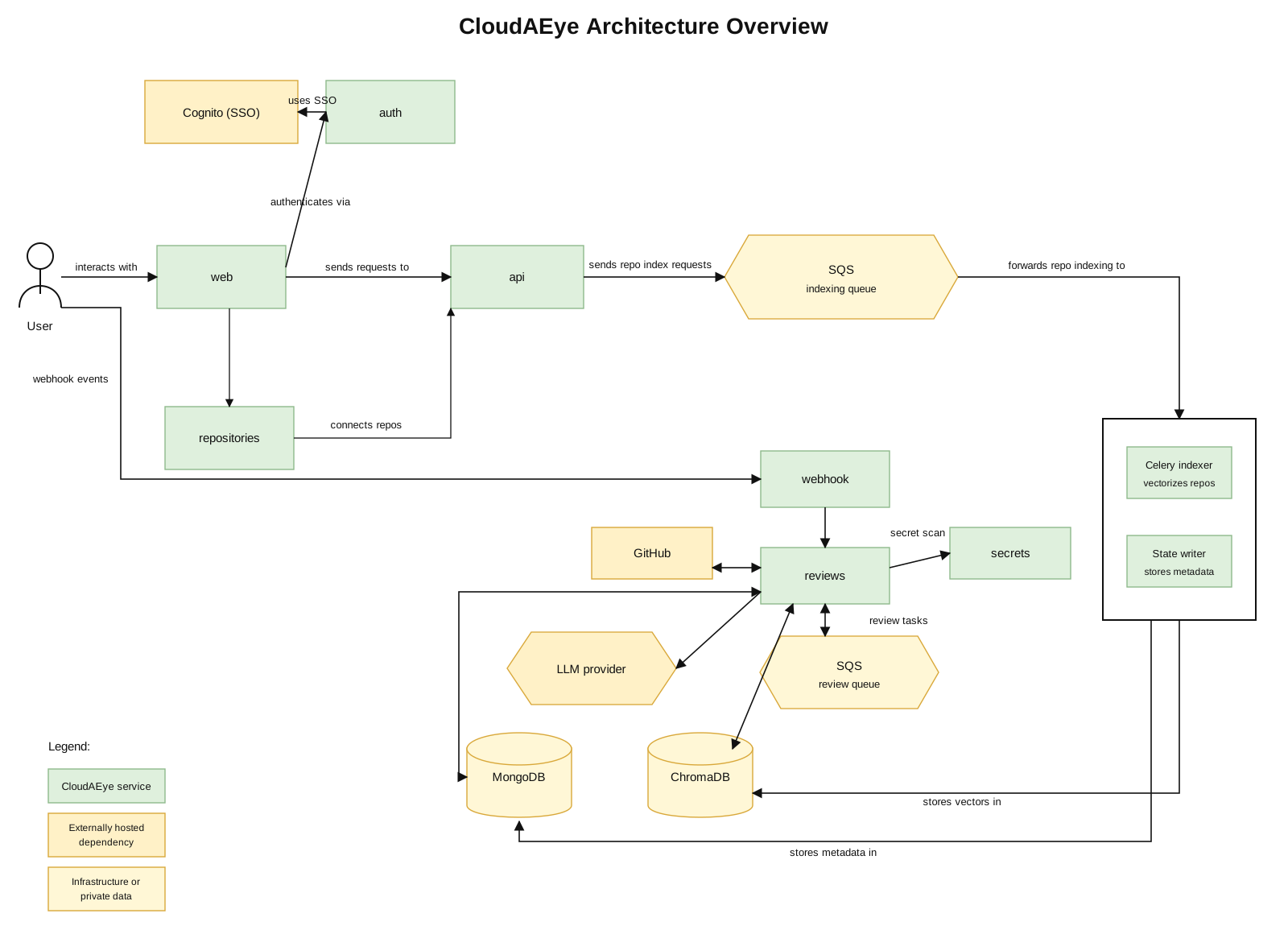
Key architectural characteristics include:
Because services are containerized, upgrades and scaling are significantly simpler than traditional monolithic deployments. Refer to this page to learn more about the system architecture.
CloudAEye provides first-class support for Amazon ECS, making enterprise deployment straightforward. Running on ECS provides numerous operational advantages:
Most importantly:
As engineering teams grow, workloads increase. CloudAEye running on ECS can automatically scale application services based on workload, allowing organizations to support anything from a small engineering team to thousands of developers without changing architecture. Benefits include:
This allows enterprises to handle large volumes of pull requests while maintaining fast review turnaround times. See the detailed instructions here.
Deploying CloudAEye on-prem follows a straightforward process. Typical steps include:
The deployment guide walks administrators through the required infrastructure, configuration, and verification steps for a production-ready installation.
CloudAEye continues to integrate with GitHub through a GitHub App, even in self-hosted deployments. This provides:
Administrators retain full control over which repositories CloudAEye on-prem can access. This follows GitHub's recommended authentication model while minimizing required permissions. Please see this page for detailed instructions.
Large organizations rarely want another username and password. CloudAEye supports enterprise Single Sign-On (SSO), allowing developers to authenticate using existing corporate identity providers. Benefits include:
This enables CloudAEye to fit naturally into existing enterprise identity ecosystems.
Organizations using Okta can integrate CloudAEye with their existing authentication infrastructure. This allows:
Developers simply sign in using their corporate credentials. Learn more here.
Many enterprises prefer open-source identity providers. CloudAEye also supports Keycloak, making it an excellent choice for organizations requiring:
This provides the flexibility to support both commercial and open-source identity platforms. Refer to this page to learn more.
Enterprise deployments require much more than simply running containers. CloudAEye is designed to integrate with existing operational practices, including:
This minimizes operational disruption while fitting naturally into existing cloud governance models.
CloudAEye's self-hosted deployment is particularly valuable for organizations operating under strict regulatory requirements. Examples include:
These organizations often require complete visibility into where software executes and where sensitive source code resides. CloudAEye enables AI-assisted code review without sacrificing these security requirements.
CloudAEye On-Prem provides:
Organizations no longer need to choose between AI-powered developer productivity and enterprise security. CloudAEye's self-hosted deployment delivers both. Developers receive fast, intelligent, human-like AI code reviews directly within GitHub, while security teams retain complete control over infrastructure, identity, networking, and source code. As AI becomes a core component of modern software engineering, enterprises need solutions that fit their security model, not the other way around. CloudAEye's on-premises deployment makes that possible.

A seasoned engineering executive, Nazrul has been building enterprise products and services for 20 years. Nazrul is the founder and CEO of CloudAEye. Previously, he was Sr. Dir and Head of CloudBees Core where he focused on enterprise version of Jenkins. Before that, he was Sr. Dir of Engineering, Oracle Cloud. Nazrul graduated from the executive MBA program with high distinction (top 10% of the cohort) at University of Michigan Ross School of Business. Nazrul is named inventor in 47 patents.
May 05, 2026. 15 min

Feb 24, 2026. 12 min
Dec 29, 2025. 10 min
Dec 11, 2025. 10 min
May 28, 2025. 12 min

February 21, 2025. 8 min

Feb 04, 2025. 5 min

Dec 17, 2024. 10 min

December 24, 2024. 5 min

Jan 14, 2025. 5 min

February 18, 2025. 12 min

January 10, 2025. 7 min

January 31, 2025. 8 min

March 11, 2025. 8 min
Solutions by Use Case
Solutions by Role
Resources
Company