CloudAEye PR Checklist

Your standards.
Every pull request.

Automate code quality, security, and engineering governance with 75+ prebuilt checks across nine categories. For code written by people. And by AI.

  1. Open a pull request
  2. Check your standards
  3. Enforce your policy
Add customer export endpointacme / billing-api   #248   ·   Illustrative PR
Open
api/export.py
def export_customers(request):
+   account = request.account
+   log.info(request.headers)
+   return export(account)
Sensitive data in logs

Request headers may include authorization tokens. Log the event without sensitive request data.

Example finding · Sensitive Data Handling

Checklist results

PR descriptionPassed
Dependency declarationPassed
Unit test coverageWarning
Merge blocked

Resolve this failed Error check or use the documented override process.

Example only. Merge blocking requires your Git host's required checks or branch restrictions and an eligible plan. Other merge requirements still apply.
75+ built-in checks Nine categories Global + repository policies Warning or Error

Best practices become policy.

Enforce the critical ones as your organization matures.

  • Consistent quality

    One standard for code quality across every team and repository.

  • Security, shifted left

    Catch vulnerabilities in the pull request, before they reach production.

  • Safer AI systems

    Dedicated checks for LLM applications, autonomous agents, and MCP integrations.

  • Enforceable policy

    Turn engineering best practices into Warning or merge-blocking Error policies.

Built for every team
that ships code.

One configurable checklist across teams, repositories, and AI-assisted workflows.

Raise the quality baseline.

Code quality & engineering standards · For engineering leaders and platform teams

Make testing, documentation, and maintainability part of every review, not another reminder from your team lead.

  • Tests & docstringsCoverage thresholds
  • DependenciesDeclared & versioned
  • PR descriptionsYour team's template
Explore quality checks

Keep risk out of the release.

Secure software delivery · For AppSec, security engineering, and compliance teams

Bring security into the pull request. Make high-risk findings mandatory gates before they become production problems.

  • Exposed credentials Error
  • Injection risks Error
  • Access-control gaps Error
Explore security checks

Scale AI code. Not shortcuts.

AI-generated code governance · For organizations scaling AI-assisted development

Apply the same quality and security standards to people and coding agents, with global defaults and repository-specific policies.

Developer Coding agent
Same standards
Explore code governance

Give agents safer boundaries.

AI agent & MCP security · For teams building agentic applications and AI infrastructure

Review the trust boundaries in LLM apps, autonomous agents, and MCP servers before tools gain access to real systems.

  • LLM applicationsPrompts & outputs
  • Autonomous agentsPermissions & actions
  • MCP serversParameters & tool safety
Explore AI & MCP checks

Govern at scale. Without a bottleneck.

Enterprise engineering governance · For VP Engineering, CTOs, and platform engineering leaders

Apply organization-wide policies, tailor them per repository, and make critical requirements mandatory merge gates.

See how configuration works
  1. Organization defaultsBaseline security and quality checks for every repository
  2. Repository overridesStricter gates for production-critical services
  3. Merge gatesError for mandatory requirements, with authorized overrides

Illustrative policies, not product defaults. Merge blocking requires eligible Git-provider settings and plans.

One checklist. Nine areas of coverage.

From PR descriptions to autonomous tool use, turn engineering expectations into repeatable checks.

Pull Request Quality

Give reviewers the context to make a better decision.

  • Title QualityClear summaries that follow your team's conventions.
  • Description CompletenessThe what and why, with your required PR template.

Set a maximum title length, required prefix, and description template.

All PR quality checks
Documentation & Readability

Keep the knowledge next to the code.

  • Docstring CoverageCheck coverage against a configurable threshold.
  • README UpdatesFlag documentation drift when APIs, CLI commands, or configuration change.
  • Code ClarityKeep code easy to read and understand.
  • Naming ConsistencyMake functions, variables, and files easier to navigate.

Default docstring threshold: 80%. Configure scope, exclusions, README triggers, and example checks.

All documentation & readability checks
Code Correctness & Maintainability

Catch the shortcuts that become tomorrow's rework.

  • Error HandlingHandle failures safely and predictably.
  • Input ValidationCheck inputs before unsafe or incorrect use.
  • No Duplicate CodeFind semantic and syntactic duplication.
  • Function SignaturesKeep changed signatures consistent across callers.

Choose Warning or Error independently for each selected check.

All code correctness & maintainability checks
Testing & Quality Assurance

Make release confidence a repeatable expectation.

  • Runtime SafetyReview algorithmic and runtime error risks.
  • Edge Case HandlingConsider boundary conditions and unexpected data.
  • Style & Syntax ComplianceCheck adherence to linting and style expectations.
  • Unit Test CoverageEvaluate coverage against your team's threshold.

Default coverage threshold: 80%. Choose PR changes or the entire codebase, test patterns, and exclusions.

All testing & quality assurance checks
Dependencies & Packaging

Reduce build failures and deployment surprises.

  • Dependency DeclarationCheck dependency and setup files when external libraries are introduced.
  • Version PinningRequire specific versions when appropriate for your production application.

Version pinning is an option within Dependency Declaration, off by default. Specify the dependency files to check.

All dependencies & packaging checks
Security & Compliance

Bring security controls into the pull request.

  • No Secrets in CodeFlag exposed credentials, tokens, and API keys.
  • Injection ProtectionReview SQL, NoSQL, and command injection risks.
  • Authentication & AuthorizationLook for missing or bypassable access controls.
  • Sensitive Data HandlingCheck for sensitive information in logs and request parameters.
  • Safe DeserializationFlag unsafe deserialization patterns.
  • Security Misconfiguration & XXEReview permissive settings and unsafe external XML references.

Use Error for critical controls with your Git host's required checks or branch restrictions configured.

All security & compliance checks
LLM and Gen AI Apps Security

Protect the boundaries around prompts, retrieval, and model outputs.

  • Prompt InjectionReview how untrusted prompts interact with instructions.
  • Sensitive Information DisclosureFlag sensitive data sent to external LLM APIs.
  • Improper Output HandlingValidate and sanitize model outputs before downstream use.
  • System Prompt LeakageCheck for unintended exposure of system instructions.
  • Vector and Embedding WeaknessesReview retrieval and embedding risks.
  • Unbounded ConsumptionCheck controls on excessive model calls and resource use.

Built for LLM and RAG applications. Agentic Security adds checks for autonomous decision-making and tool use.

All llm and gen ai apps security checks
Agentic Security

Put boundaries around autonomous actions.

  • Memory PoisoningReview how persistent memory accepts untrusted data.
  • Tool Misuse & Privilege CompromiseCheck tool chains and permissions for unintended actions.
  • Resource OverloadFlag unbounded execution, planning, and delegation.
  • Intent Breaking & Goal ManipulationReview controls against redirected agent goals.
  • Repudiation & UntraceabilityCheck whether agent actions can be traced.
  • Human Approval & Agent CommunicationReview approval overload and poisoned inter-agent messages.

Use alongside application security checks. Representative checks shown; the full catalog also covers cascading hallucinations, code execution, and rogue agents.

All agentic security checks
MCP Server

Expose useful tools without exposing avoidable risks.

  • Definitions & DocumentationMake tools, resources, prompts, and parameters clear.
  • Tool Parameter HandlingCheck types, constraints, required fields, and hidden secrets.
  • Return ValidationKeep outputs structured, valid, and appropriately sized.
  • Error & Timeout HandlingHandle failures without leaking internal details.
  • Safe Tool ExecutionReview confirmation, rate limiting, and idempotency.
  • Sampling & ElicitationCheck prompt injection defenses and client-response validation.

Coverage spans six areas of MCP implementation, from definitions to autonomous tool interactions.

All mcp server checks

Representative checks shown. Version pinning is a Dependency Declaration option. See the documentation for the complete catalog and configuration.

A shared baseline. Room for each repository.

Set organization-wide standards, then tailor the checks to the code and the team.

  1. Define global defaults

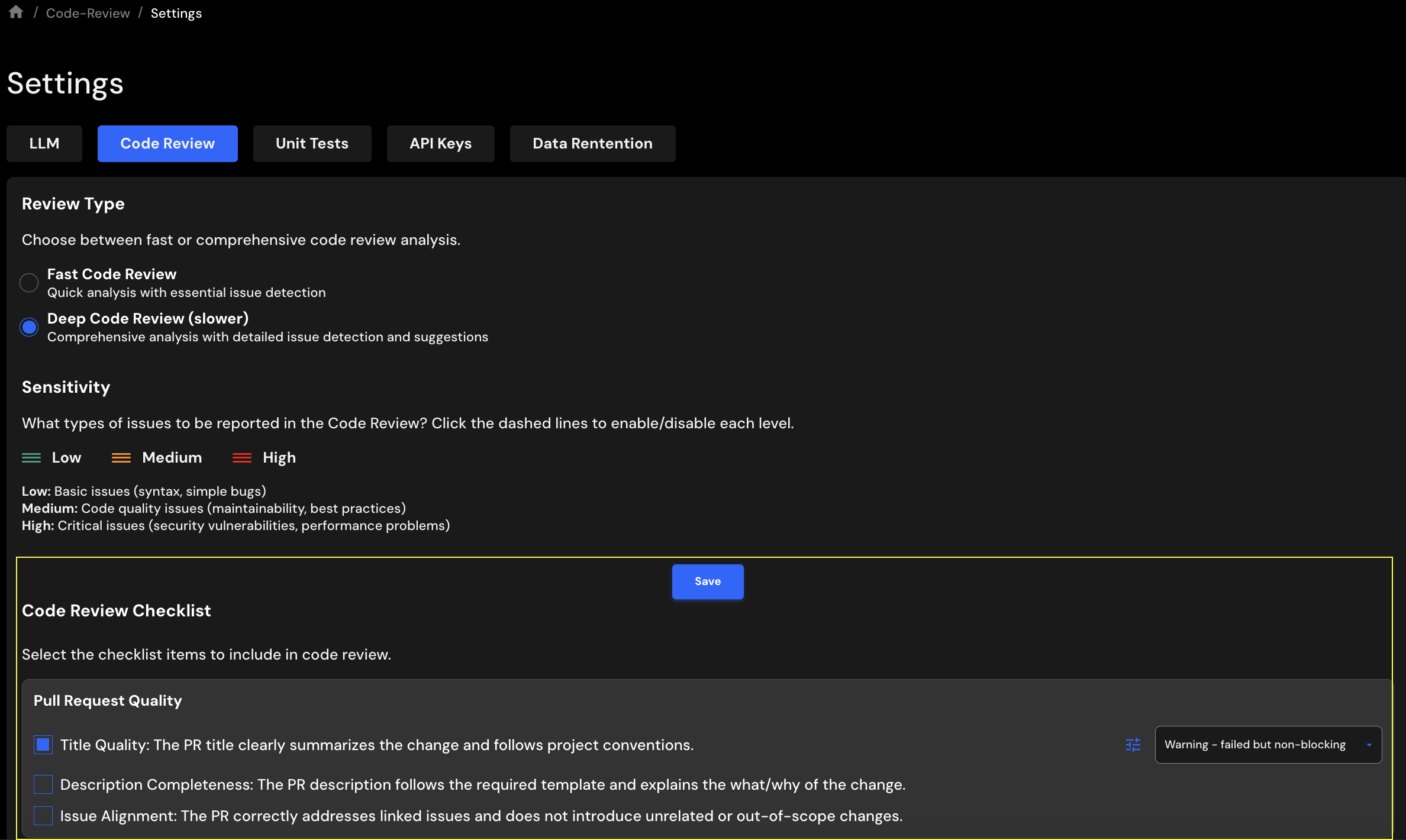
    Open Settings > PR Checklist, select checks, and set each to Warning or Error.

  2. Adapt by repository

    In Integrations > Repos, edit a repository's tools and open PR Checklist. Repository settings override global defaults.

  3. Tune the details

    Use Configure additional options for thresholds, scope, templates, and exclusions.

PR title length
50 characters
Docstring coverage
80%
Unit test coverage
80%
Coverage scope
PR changes or entire codebase
Version pinning
Off

Tip: start thresholds around 50% and raise them as coverage improves. Exclude generated files with globs like *.min.js or migrations/*.

Read the documentation
CloudAEye Code Review settings showing selected checklist items and per-check enforcement menus.
CloudAEye settings · product screenshot from the documentation

The result lives with the pull request.

Selected checks run during code review. Developers see findings in the workflow they already use.

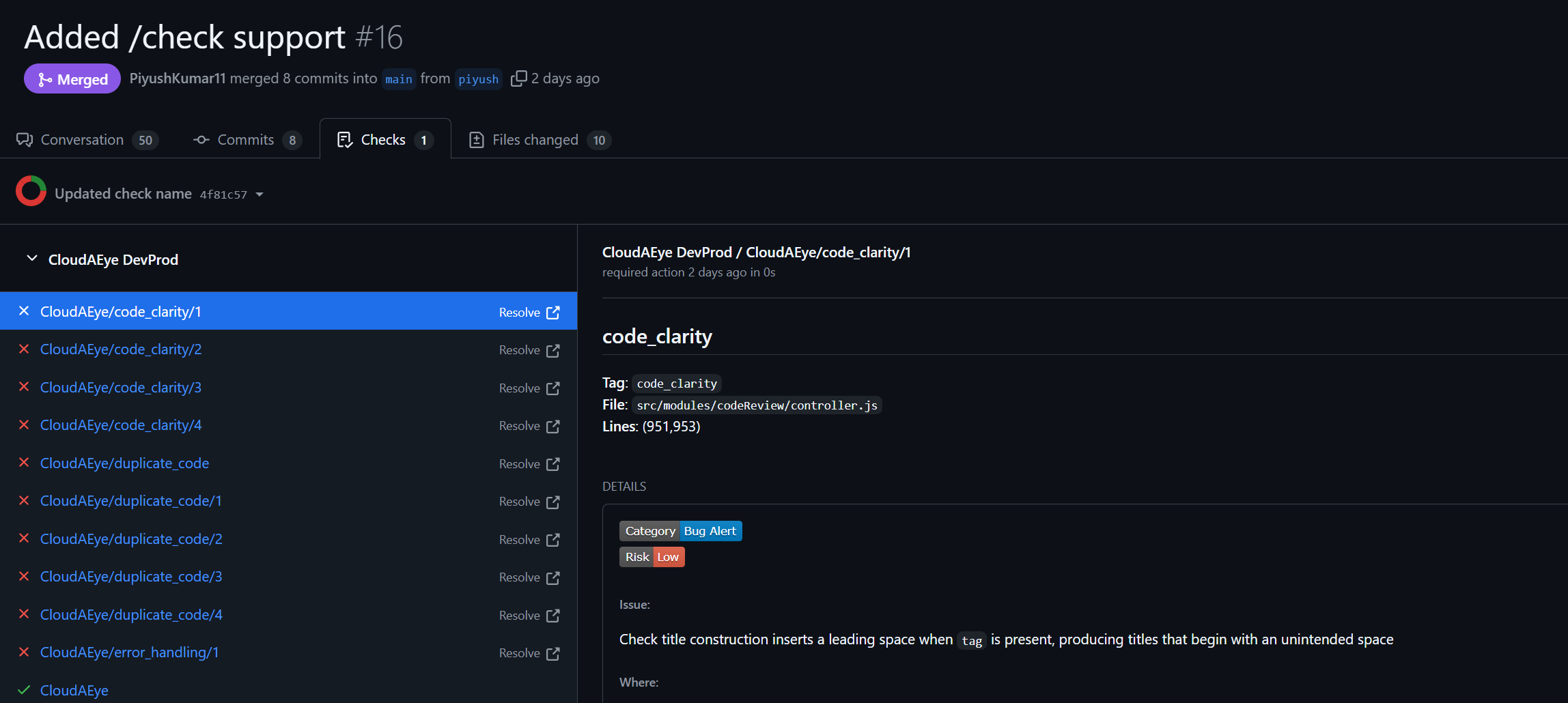
CloudAEye checklist findings in GitHub's Checks tab, with a code clarity finding selected.
GitHub Checks · product screenshot from the documentation

In your Git workflow

GitHubOne Checks tab entry per failed check. Blocking on private repositories needs GitHub Team or above.

GitLabFailures reported through pipelines and jobs, with merge blocking.

BitbucketCommit statuses, comments, and a summary table. Branch restrictions need the Premium plan.

Provider setup details

Start with the PR you're about to merge.

Evaluate every selected check again after you push a fix.

@cloudaeye /check

Read the PR Checklist guide

Override a failed Error check

Mark the check successful for an approved exception, under your governance process.

@cloudaeye /ignore_check

Govern code at AI speed.
Ship with confidence.

Make engineering standards part of every pull request.

Book a demo